
Current position: Home > Video & Image > > Article
HEIC Image Viewer - Converter Supported
 Software Hub
2022-02-25
0 reviews
Software Hub
2022-02-25
0 reviews
HEIC Image Viewer - Converter Supported
Batch convert heic or other images
 HEIC Image Viewer - Converter Supported is a cool viewer and converter for image files, especially the HEIC.
Printing Viewing and Batch Conversion features are included. It is developed with a modern interface library.

Details description
It is free to view images of any format. If you want to Print and Convert your images, you might need upgrade to the full version which costs $2.99. The formats supported as follow:
heic; svg; svgz; ttf; tiff; tif; tga; svgz; bmp; jpg; jpeg; png; gif;jp2;ppm;nef;svg;arw;crw;bmp2; threefr; threeg2; threegp; a;arw;avs; b; bgr; bgra; bgro; bmp; bmp2; bmp3; c; cal; cals; canvas; caption; cin; clip; cmyk; cmyka; cr2; crw; cur; cut; dcm; dcr; dcx; dds; dfont; dib; dng; dpx; dxt1; dxt5; epdf; epi; eps; epsf; epsi; ept; ept2; ept3; erf; fax; file; fits; fractal; ftp; fts; g; g3; g4; gif; gif87; gradient; gray; graya; group4; hald; hdr; heic; hrz; http; https; icb; ico; icon; iiq; inline; ipl; j2c; j2k; jng; jnx; jp2; jpc; jpe; jpeg; jpg; jpm; jps; jpt; k; k25; kdc; label; m; m2v; mac; map; mask; mat; mef; miff;mng; mono; mpc; mrw; msl; msvg; mtv; mvg; nef; nrw; null; o; orf; otb; otf; pal; palm; pam; pango; pattern; pbm; pcd; pcds; pcl; pct; pcx;pdfa; pef; pes; pfa; pfb; pfm; pgm; pgx; picon; pict; pix; pjpeg; plasma; png; png00; png24; png32; png48; png64; png8; pnm; ppm;ptif; pwp; r; radialgradient; raf; ras; raw; rgb; rgba; rgbo; rgf; rla; rle; rmf; rw2; scr; screenshot; sct; sfw; sgi; six; sixel; sr2;stegano; sun; text; tga; tif; tiff; tiff64; tile; tim; ttc; ttf; txt; uyvy; vda; vicar; vid; viff; vips; vst; wbmp; wpg; x3f; xbm; xc; xcf; xpm; xv; y; ycbcr; ycbcra; yuv;emf; exr; flif; wmf; webp
Use Guides
Using image viewer feature of this app.
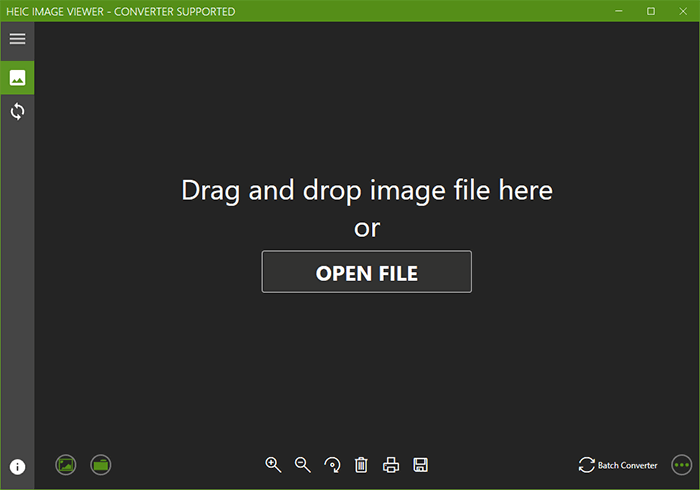
- 1. Click the "Open File" button or drag the file to the dialog.
-
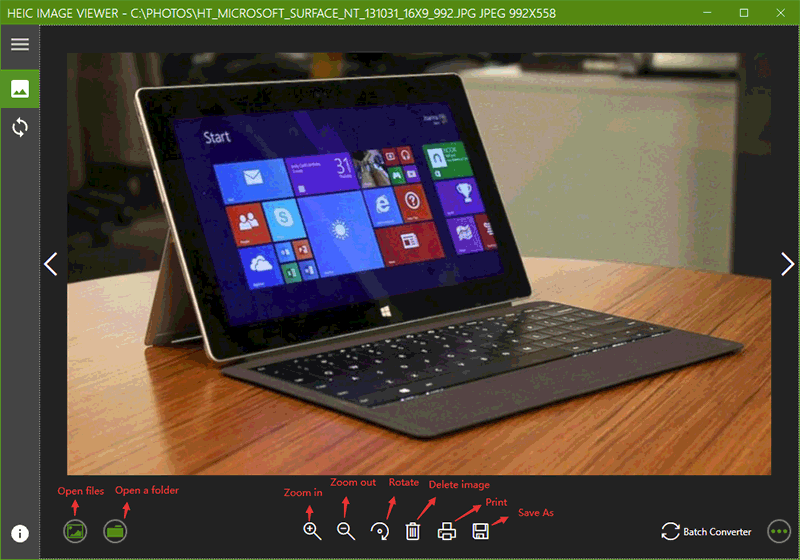
- 3. Rotate the image through clicking the rotate button on the bottom.
- 4. Delete the image through clicking the delete button on the bottom.
- 5. Print and Save the image as another format.
Note: You should input the saved file name and extension when save the image as another format.
- Next Post:Coolle SVG Viewer - Converter Supported
- Previous Post:Cool PSD Viewer - Use Manual





- Support us by Donate
-
Inorder to keep our app free to all the uses, We need the support to continue work. And you will be appreciated.


- Search
-
- Support Us by Using Free Products
- Featured Products
- Recommend Articles


-
- The newest
- Hot
- Random















- Random tag
- Latest reviews
-
- Free PDF Converter 's comments:
"I just put together a full week of scroll-stopping branded social media content f"
- CoolleOffice中文版完整教程 's comments:
"Hi, I hope youre doing well! I’m reaching out to see if you’d be open to a li"
- X Live Wallpaper 's comments:
"THE FASTEST WAY TO CREATE, PUBLISH, PROFIT FROM EBOOKS… NO WRITING REQUIRED PRO"
- X Live Wallpaper 's comments:
"THE FASTEST WAY TO CREATE, PUBLISH, PROFIT FROM EBOOKS… NO WRITING REQUIRED htt"
- Full Tutorials for Coolle Offic 's comments:
- Friendly link